
Meet the Researcher and Analyst: Copilot’s Two New Power Agents for Knowledge Workers

📣 Rollout status: The Researcher and Analyst agents are rolling out as part of Microsoft 365 Copilot Wave 2. Availability may vary by tenant and region. Check your Microsoft 365 Message Center for rollout timing in your organization.
⚠️ License required: Microsoft 365 Copilot add-on — These agents are not included in standard Microsoft 365 plans. You’ll need the Copilot add-on (currently licensed per user) to access them through the Agent Store. Check with your IT admin if you’re unsure what you have.
If you’ve ever spent a Friday afternoon buried in research tabs, cross-referencing analyst reports, trying to pull together a summary that doesn’t make you look like you guessed—good news. Microsoft heard you.
Wave 2 of Microsoft 365 Copilot introduced two specialized agents that are genuinely different from the general-purpose Copilot Chat you may already be using: Researcher and Analyst. They live in the Agent Store—Microsoft’s new hub for discovering, deploying, and managing AI tools built for specific business workflows—and they’re designed for the kind of deep, context-heavy work that generic AI assistants tend to fumble.
Here’s what they are, how they work, and why knowledge workers in finance, consulting, and project management should pay attention.
So… What Are the Researcher and Analyst Agents?
Think of standard Copilot Chat like a brilliant generalist colleague—great for drafting emails, summarizing meetings, or answering quick questions. Now imagine you also had access to two specialists on the team:
Researcher is your deep-dive expert. It’s built to handle complex, multi-step research tasks—synthesizing information across your Microsoft 365 data (emails, documents, chats) and the web. It can follow a thread of inquiry, pull in relevant context, and surface insights that would take you hours to compile manually. Think of it like having a sharp research associate who actually reads everything before the meeting instead of skimming it in the elevator.
Analyst is your numbers person. It’s designed to reason over structured data—think spreadsheets, reports, and datasets—and surface patterns, trends, or answers to business questions without you needing to write a single formula. It’s not just “describe this table.” It actually reasons through the data and gives you analysis you can use.
Both agents are accessible through the Agent Store inside Microsoft 365 Copilot, which is essentially an app store for AI—a place where you can find purpose-built agents, deploy them to your workflow, and manage what’s available across your organization.
Why This Is a Big Deal
- Depth over breadth. General Copilot Chat is optimized to handle any question reasonably well. Researcher and Analyst are optimized to handle specific question types really well. That specialization changes the quality of the output.
- Your data + the web. Researcher can synthesize across your internal Microsoft 365 content and real-time web results. That combination—proprietary context plus current information—is where knowledge work actually lives.
- No data science degree required. Analyst brings structured data reasoning to people who work in Excel but don’t write SQL. Ask it a business question, point it at your data, and get an actual answer—not just a prettier version of the spreadsheet you started with.
- The Agent Store changes the game. This isn’t just two new features. The Agent Store signals a shift toward a modular, composable Copilot—one where the right AI tool shows up for the right job, rather than one assistant that tries to do everything.
- Governance your IT team will appreciate. Admins can control which agents are available to users via the Agent Store, which means this isn’t a free-for-all. IT can curate what’s deployed and what’s not.
How to Access Researcher and Analyst
📌 Admin note: Your IT admin may need to enable the Agent Store and specific agents before they appear in your Microsoft 365 Copilot interface. If you don’t see them, that’s the first call to make.
- Open Microsoft 365 Copilot (via Teams, Microsoft365.com, or the Copilot app).
- Look for the Agent Store option—it typically appears in the left-hand navigation or within the Copilot chat interface as a way to extend what Copilot can do.
- Search for Researcher or Analyst in the Agent Store.
- Select the agent and choose Add or Use to deploy it to your workflow.
- Once added, you can invoke it directly from Copilot Chat—just start a conversation with the agent as your context.
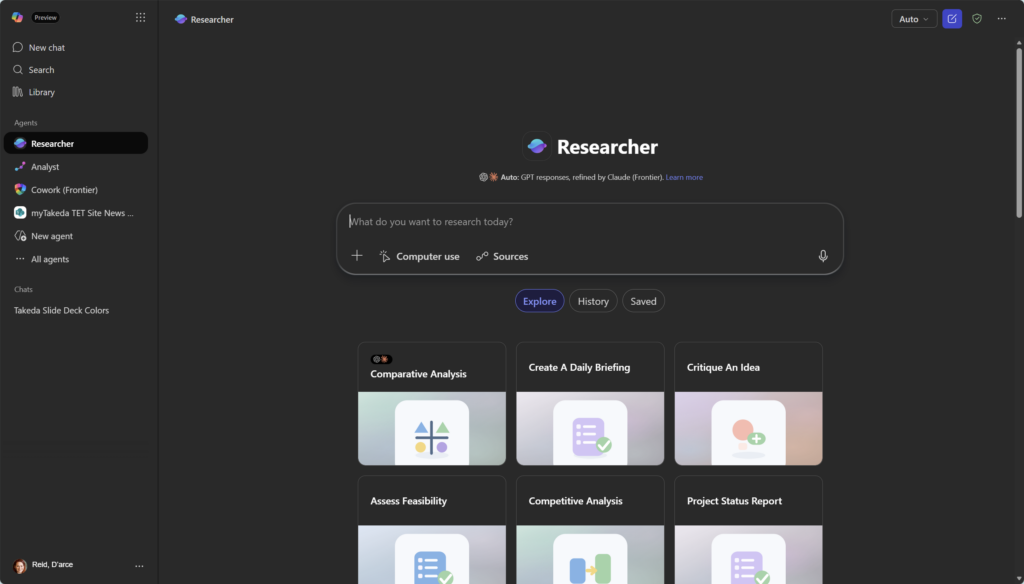
(Note: steps may vary slightly depending on your tenant configuration or rollout status.)
A Practical Breakdown by Role
This is where it gets real. These agents aren’t useful in the abstract—they’re useful for specific types of work. Here’s how they map to common knowledge worker roles:
Finance Professionals Analyst is your new best friend. Point it at quarterly reports, budget spreadsheets, or variance data and ask business questions in plain English. “Which cost centers are trending over budget this quarter?” or “How does our Q1 performance compare to the same period last year?” You get reasoned analysis, not just reformatted rows.
Researcher helps with market research, competitive intelligence, and pulling together context for investment memos or board presentations—combining internal data from emails and documents with current web sources.
Project Managers Researcher is a natural fit for project kickoffs, lessons-learned synthesis, and stakeholder alignment. Feed it a brief, let it search your organization’s past project files, and ask: “What risks did we encounter on similar infrastructure projects?” You’ll stop reinventing wheels you didn’t know existed.
Analyst helps when you’ve got resource data, timelines, or budget actuals in spreadsheets and you want to quickly ask: “Are we trending toward a schedule overrun?” without building a full pivot table.
Consultants This is arguably where both agents shine brightest. Researcher can accelerate client research, due diligence, and industry briefings. Analyst can work through client-provided data to surface patterns before your first working session. Less time reading in. More time advising.
Quick Tips
- Be specific with your prompts. These agents are more capable than general Copilot, but they still perform best when you give them a clear task with context. “Analyze Q1 sales data for regional trends” will always beat “look at this spreadsheet.”
- Don’t assume it replaces verification. Analyst reasons well, but you should still sanity-check outputs before they go into a client deck or board report. AI-generated analysis is a starting point, not a final answer.
- Use Researcher for synthesis, not just summarization. The real value isn’t “summarize this document”—it’s “pull together everything we know about this topic across my emails, Teams messages, and the web.” That’s where it earns its keep.
- IT admins: the Agent Store is your new governance surface. Think proactively about which agents you want available and to whom. This is the kind of decision that’s easier to make before users start asking.
When to Use These Agents / Best Used For
- Complex research tasks that span multiple sources (internal + web)
- Structured data analysis where you need business reasoning, not just visualization
- Pre-meeting prep, due diligence, and synthesis work
- Finance, consulting, strategy, and project management workflows
When NOT to Use Them / Things to Know
They’re not for simple tasks. If you need a quick email drafted or a meeting summarized, standard Copilot Chat is faster and more appropriate. Reaching for Researcher to answer “what time is our standup?” is like calling in a specialist to take your temperature.
Analyst isn’t a replacement for Power BI. If your organization has mature BI infrastructure and dashboards, Analyst complements that—it doesn’t replace it. Use it for ad-hoc reasoning; use Power BI for systematic reporting.
Data quality matters. Analyst is only as good as the data you feed it. Messy, inconsistent, or poorly structured spreadsheets will produce messy analysis. Garbage in, garbage out—just with fancier language.
Licensing is real. Both agents require the Microsoft 365 Copilot add-on. There’s no workaround, and there’s no lite version. If your team doesn’t have the license, this isn’t available—full stop.
Rollout is still in progress. As of Wave 2, availability may not be uniform across all regions and tenant types. If you’re expecting it and don’t see it, check the Message Center before filing a support ticket.
Wrapping It Up
Researcher and Analyst aren’t incremental updates—they’re a meaningful shift in how Copilot fits into knowledge work. The Agent Store model suggests Microsoft is thinking about Copilot less like a single assistant and more like a platform, where the right specialized tool is available for the right job.
For knowledge workers who’ve felt like AI assistants were helpful-but-shallow, this is the answer to that frustration. These agents are built to do the hard, context-heavy, multi-source work that makes up a big chunk of the day for people in finance, consulting, and project management.
Here’s a concrete place to start: this week, pick one research task you’d normally spend two-plus hours on—a competitive landscape brief, a project risk summary, a budget variance analysis—and hand it to Researcher or Analyst instead. Don’t just evaluate the time saved. Evaluate the quality of the starting point it gives you. That’s where you’ll feel the difference.
Honestly? The part I find most exciting isn’t the individual agents—it’s the Agent Store as a concept. The idea that knowledge workers can reach for purpose-built AI tools the same way they reach for the right app? That’s a shift worth watching.